(PC vs Console battle and more) by jackis

Cześć!#
Nie spotkałem w swoim życiu osoby, która nie miałaby do czynienia z grami komputerowymi. Gdy przyszedł czas, w którym sam zacząłem zastanawiać się nad kupnem konsoli, szybko dotarło do mnie, że tworząc ją z PC-ta, zyskam znacznie więcej swobody. W tym wpisie przedstawię dlaczego tak jest.
Kryteria wyboru#
Moim celem była dostępność gier i cena. Wybrałem system windows bo gry na linuxie są rzadkością 😞.
Poniżej opisałem co przekonało mnie do windows jako konsola:
- Dostępność gier i niska cena - łatwy dostęp do nowych tytułów na platformach gierkowych.
- Recykling i długowieczność sprzętu - PC są dłużej wspierane przez producentów (sterownikami, łatkami bezpieczeństwa, etc.). Poza tym mam w domu konsolę Xbox360 gen.7 aktualnie jest ciekawym dodatkiem retro. Posiadam także komputer “gamingowy” z tamtych czasów zasilany procesorem i7, który świetnie sobie radzi z wirtualizacją w home-lab.
- Pełna kontrola - z czym zostanę, kiedy serwery wydawcy gry lub producenta konsoli przestaną być oficjalnie wspierane?
- Koszt sprzętu - PC wyniósł mnie trochę więcej niż PS-slim ale mniej niż PS-Pro.
Jak to działa na co dzień#
Komputer jest podłączony do telewizora i znajduje się obok niego. Pady które używam to Gamesir, dobrze spełniają swoje zadanie. Można je kupić tanio na promocji na pomarańczowej chińskiej stronie. Przy większych rozgrywkach (5 padów) pojawił się problem z zakłóceniami sygnału, kiedy dongle były wpięte zbyt blisko siebie - wystarczyło je odseparować.
RDP i dwie sesje na jednym komputerze#
Podczas gdy na TV Geralt ugania się za babami wodnymi, ja po RDP na tym samym komputerze męczę model językowy, kompiluję kod (konsole chyba tego nie potrafią).
Sprawdza się to dobrze. Komputer jest podpięty po kablu do internetu więc połączenie RDP jest stabilne. System z RTX4060 umożliwia grę w wiedźmina 3 na wysokich ustawieniach i jednoczesne korzystanie z lokalnego modelu LLM 14B, lub po prostu pracę przy post-trainingu modeli.
Jak to Zrobić?#
Program RDP Wrapper w moim przypadku nie działał.
Aby skutecznie uruchomić ten skrypt umożliwiający wiele sesji należy uruchomić go lokalnie z konta administratora. Po wykonaniu można korzystać w pełni z okna.
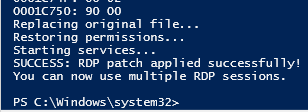
Ten skrypt jest zaktualizowaną wersją skryptu: termsrv_rdp_patch
  1
  2
  3
  4
  5
  6
  7
  8
  9
 10
 11
 12
 13
 14
 15
 16
 17
 18
 19
 20
 21
 22
 23
 24
 25
 26
 27
 28
 29
 30
 31
 32
 33
 34
 35
 36
 37
 38
 39
 40
 41
 42
 43
 44
 45
 46
 47
 48
 49
 50
 51
 52
 53
 54
 55
 56
 57
 58
 59
 60
 61
 62
 63
 64
 65
 66
 67
 68
 69
 70
 71
 72
 73
 74
 75
 76
 77
 78
 79
 80
 81
 82
 83
 84
 85
 86
 87
 88
 89
 90
 91
 92
 93
 94
 95
 96
 97
 98
 99
100
101
102
103
104
105
106
107
108
109
110
111
112
113
114
115
116
117
118
119
120
121
122
123
124
125
126
|
# Updated RDP patch script for Windows 11 (post September 2024 update)
# Run as Administrator

# Stop RDP services
Write-Output "Stopping RDP services..."
Stop-Service UmRdpService -Force -ErrorAction SilentlyContinue
Stop-Service TermService -Force -ErrorAction SilentlyContinue

# Backup and take ownership
$termsrv_dll_path = "c:\windows\system32\termsrv.dll"
$termsrv_dll_acl = Get-Acl $termsrv_dll_path

Write-Output "Creating backup..."
Copy-Item $termsrv_dll_path "$termsrv_dll_path.backup_$(Get-Date -Format 'yyyyMMdd_HHmmss')"

takeown /f $termsrv_dll_path
$new_termsrv_dll_owner = (Get-Acl $termsrv_dll_path).owner
cmd /c "icacls $termsrv_dll_path /Grant $($new_termsrv_dll_owner):F /C"

# Read file as bytes
Write-Output "Reading termsrv.dll..."
$dll_as_bytes = Get-Content $termsrv_dll_path -Raw -Encoding byte
$dll_as_text = $dll_as_bytes.forEach('ToString', 'X2') -join ' '

# Multiple patterns for different Windows 11 versions
$patterns = @(
    @{
        name = "Pattern 1 (Old)"
        regex = [regex]"39 81 3C 06 00 00(\s\S\S){6}"
        patch = "B8 00 01 00 00 89 81 38 06 00 00 90"
    },
    @{
        name = "Pattern 2 (22H2/23H2)"
        regex = [regex]"39 81 3C 06 00 00(\s\S\S){6}"
        patch = "B8 00 01 00 00 89 81 38 06 00 00 90"
    },
    @{
        name = "Pattern 3 (24H2)"
        regex = [regex]"8B 99 3C 06 00 00 8B B9 38 06 00 00"
        patch = "B8 00 01 00 00 89 81 38 06 00 00 90"
    },
    @{
        name = "Pattern 4 (Latest 2024)"
        regex = [regex]"39 87 3C 06 00 00(\s\S\S){6}"
        patch = "B8 00 01 00 00 89 87 38 06 00 00 90"
    }
)

$pattern_found = $false
$dll_as_text_replaced = $null

Write-Output "Searching for patterns..."
foreach ($pattern in $patterns) {
    Write-Output "Checking $($pattern.name)..."
    $checkPattern = Select-String -Pattern $pattern.regex -InputObject $dll_as_text

    if ($checkPattern -ne $null) {
        Write-Output "Found $($pattern.name)! Applying patch..."
        $dll_as_text_replaced = $dll_as_text -replace $pattern.regex, $pattern.patch
        $pattern_found = $true
        break
    }
    elseif (Select-String -Pattern $pattern.patch -InputObject $dll_as_text) {
        Write-Output "The termsrv.dll file is already patched with $($pattern.name), exiting"
        Set-Acl $termsrv_dll_path $termsrv_dll_acl
        Start-Service UmRdpService -ErrorAction SilentlyContinue
        Start-Service TermService -ErrorAction SilentlyContinue
        Exit 0
    }
}

if (-not $pattern_found) {
    Write-Output "ERROR: No known pattern found in this version of termsrv.dll"
    Write-Output "This might be a newer version that requires manual analysis."

    # Save hex dump for manual analysis
    $hex_dump_path = "c:\temp\termsrv_hexdump_$(Get-Date -Format 'yyyyMMdd_HHmmss').txt"
    New-Item -ItemType Directory -Path "c:\temp" -Force -ErrorAction SilentlyContinue
    $dll_as_text | Out-File -FilePath $hex_dump_path
    Write-Output "Hex dump saved to: $hex_dump_path"
    Write-Output "Please analyze this file to find the new pattern."

    # Restore ACL and start services
    Set-Acl $termsrv_dll_path $termsrv_dll_acl
    Start-Service UmRdpService -ErrorAction SilentlyContinue
    Start-Service TermService -ErrorAction SilentlyContinue
    Exit 1
}

# Apply the patch
Write-Output "Applying patch..."
try {
    [byte[]] $dll_as_bytes_replaced = -split $dll_as_text_replaced -replace '^', '0x'
    Set-Content "$termsrv_dll_path.patched" -Encoding Byte -Value $dll_as_bytes_replaced

    Write-Output "Comparing files..."
    fc.exe /b "$termsrv_dll_path.patched" $termsrv_dll_path

    Write-Output "Replacing original file..."
    Copy-Item "$termsrv_dll_path.patched" $termsrv_dll_path -Force

    Write-Output "Restoring permissions..."
    Set-Acl $termsrv_dll_path $termsrv_dll_acl

    Write-Output "Starting services..."
    Start-Service UmRdpService -ErrorAction SilentlyContinue
    Start-Service TermService -ErrorAction SilentlyContinue

    Write-Output "SUCCESS: RDP patch applied successfully!"
    Write-Output "You can now use multiple RDP sessions."
}
catch {
    Write-Output "ERROR: Failed to apply patch: $($_.Exception.Message)"

    # Restore from backup if something went wrong
    if (Test-Path "$termsrv_dll_path.backup*") {
        $latest_backup = Get-ChildItem "$termsrv_dll_path.backup*" | Sort-Object LastWriteTime -Descending | Select-Object -First 1
        Copy-Item $latest_backup.FullName $termsrv_dll_path -Force
        Write-Output "Restored from backup: $($latest_backup.Name)"
    }

    Set-Acl $termsrv_dll_path $termsrv_dll_acl
    Start-Service UmRdpService -ErrorAction SilentlyContinue
    Start-Service TermService -ErrorAction SilentlyContinue
    Exit 1
}
|
Ostrzeżenie!#
Problem nie wystąpił z powyższą wersją przez dodanie Multiple patterns.
Wcześniej korzystałem ze skryptu opisanego w tym poradniku: win-os-hub , ale po ostatniej aktualizacji Windows11 z 29.09.2025 po wykonaniu skryptu nie mogłem zalogować się na żadnego użytkownika w systemie, bez problemu mogłem wrócić do stanu systemu przed tą aktualizacją.
Problemem o którym także warto wspomnieć są aktualizacje windowsa, po każdej aktualizacji na nowo trzeba uruchamiać skrypt z lokalnego użytkownika.
Podsumowanie#
Jest to rozwiązanie wymagające niewielkiego zaangażowania, ale w zamian daje coś, czego nie oferuje żadna zamknięta platforma: pełną wolność.